Works on every platform
From Shopify to custom React storefronts — add Rivet in minutes. No-code embed for most platforms, npm package for developers.
 Shopify
Shopify
The #1 ecommerce platform
Install Rivet Chat directly from rivet-chat.com/install and turn on the App embed — no theme.liquid paste required. The chat bubble appears on your live theme in under 2 minutes.
- 1Install Rivet Chat from rivet-chat.com/install and open the app → Setup.
- 2Click through to the theme editor / App embeds for your published theme.
- 3Enable the Rivet Chat embed and save the live theme (draft themes do not show to shoppers).
- 4Confirm your Tenant ID on Setup, then open the storefront and test the bubble.
Optional snippet (App Embed path needs no paste)
<!-- Optional custom snippet (App Embed path needs no paste) -->
<link rel="stylesheet" href="https://rivet-chat.com/static/chat.css?v=39">
<script src="https://rivet-chat.com/static/chat.js?v=39" defer></script>
<script>
window.addEventListener("DOMContentLoaded", function () {
  SmartReply.init({
    server: "https://rivet-chat.com",
    tenantId: "t-xxxxxxxx",
    title: "Customer Support",
    primaryColor: "#2563eb"
  });
});
</script>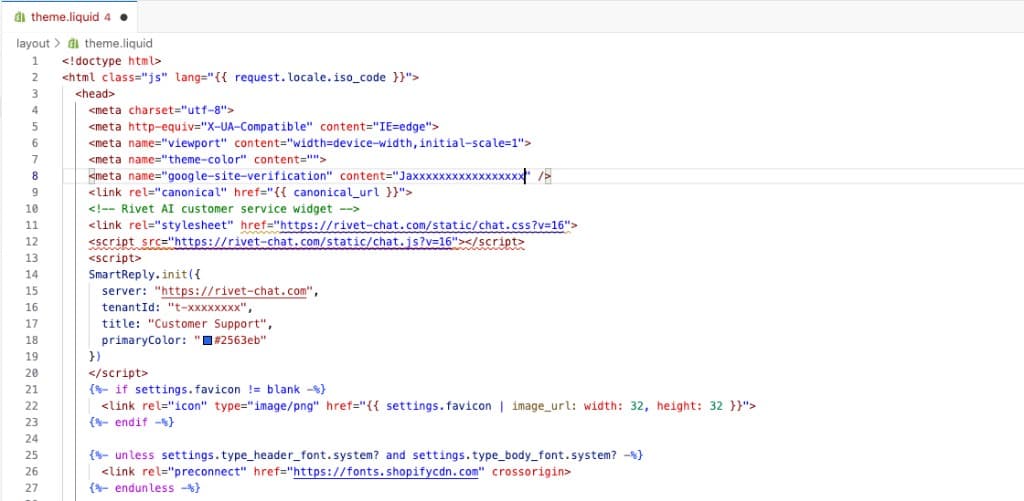
WooCommerce
WordPress ecommerce
Running WooCommerce on WordPress? Rivet drops in via a custom HTML block or your theme's footer — no plugin installation required.
- 1Copy your embed code from the Rivet dashboard.
- 2In WordPress, go to Appearance → Customize → Additional HTML (or use a header/footer plugin).
- 3Paste the snippet into the footer section.
- 4Publish. The widget appears across your whole store.
React / Next.js
For custom-built stores
Building a headless storefront with React or Next.js? Use our npm package for a clean, typed integration — SSR-safe and tree-shakeable.
- 1Install: npm install smartreply-chat
- 2Import and initialize in a client component (useEffect for Next.js).
- 3Pass your server URL and tenant ID.
- 4The widget mounts to document.body, outside React's virtual DOM.
import SmartReply from 'smartreply-chat'

useEffect(() => {
  SmartReply.init({
    server: 'https://rivet-chat.com',
    tenantId: 't-xxxxxxxx',
    platform: 'custom',
  })
}, [])Custom / Any website
BigCommerce, Wix, Magento, and more
Rivet works on any website that lets you add a script tag. BigCommerce, Wix, Magento, Squarespace, or a hand-coded HTML site — all supported.
- 1Copy your embed code from the Rivet dashboard.
- 2Find where your site allows custom HTML/scripts (usually in theme settings or a Code Injection section).
- 3Paste the snippet into the <head> or before </body>.
- 4Save and publish. Done.
- 5For product-card Add to cart on a custom cart, wire RivetChat.onAddToCart — see the custom Add to cart guide.
Custom store Add to cart guide →
Get your embed code →Turn product pages into a sales desk
Pitch the item shoppers are viewing, answer from live data, and let them add to cart from the chat.
Start free